Twitch can be low-key unwatchable without Twitch Turbo, but don’t let that stop Twitch viewers from tuning into your stream.
Pre-roll ads can make Twitch unwatchable, and while Affiliates and Partners must run ads, you can turn them off with the right settings.
In general, you have 2 options for ads:
1: Pre-Rolls On: Pre-rolls on and fewer mid-roll ads
2: Ads On: No pre-roll ads and larger mid-roll ads
I personally prefer option two when I did not have Turbo, as I would like to get a feel for a stream before chatting or getting involved in their community. Having pre-rolls on means that there is already a barrier to entry, and I would tend to click off and find someone else to watch.
Turn Off Pre-Rolls Step By Step
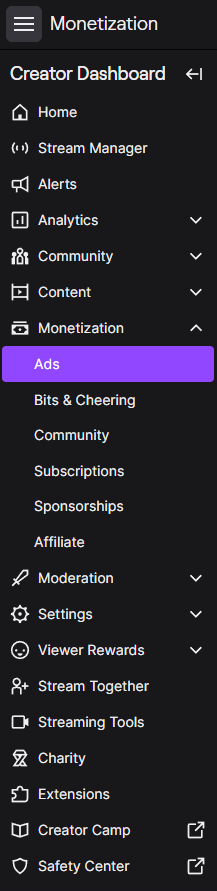
Step 1. Go to your Monetization Settings
In your Twitch Dashboard, go to the monetization tab and click into “Ads”.
Step 2. Turn on Ads Manager
First thing, you must turn on your “Ads Manager”; if this is turned off, you will have pre-rolls fully enabled.

Step 3. Configure your settings
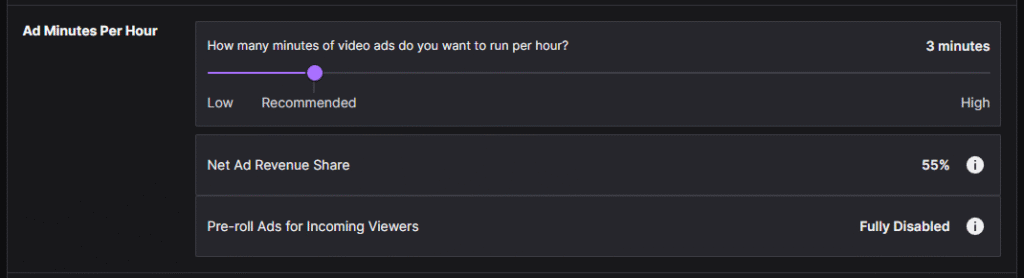
To ensure pre-rolls are fully disabled, make sure you run 3 minutes of ads per hour.
Under General, make sure to select “Disable pre-roll ads when I run ads”
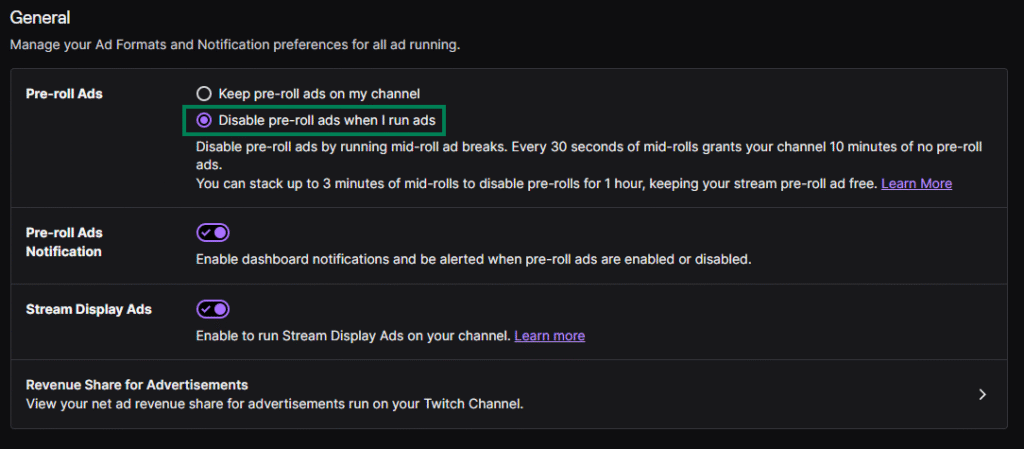
Now, you should have no pre-rolls and only mid-rolls!
If your favourite streamer has pre-rolls, send them here LOL JK but if you have Amazon Prime, don’t forget you can get a FREE sub to a streamer of your choice per month.
tl;dr
Running a 30-second ad break means pre-rolls will be disabled for 10 minutes.